Proximity insights combine nearby place data with your lead sites to surface how well-connected each location is to key infrastructure. Instead of eyeballing distances on Google Maps, you get structured, comparable data that helps your team make faster acquisition decisions.
How proximity analysis works
When you add nearby places (schools, hospitals, transit, etc.), Proquiro calculates the distance between each nearby place and your lead sites. This data appears in:
- Lead site detail pages — See exactly which infrastructure is closest to a specific site, sorted by distance.
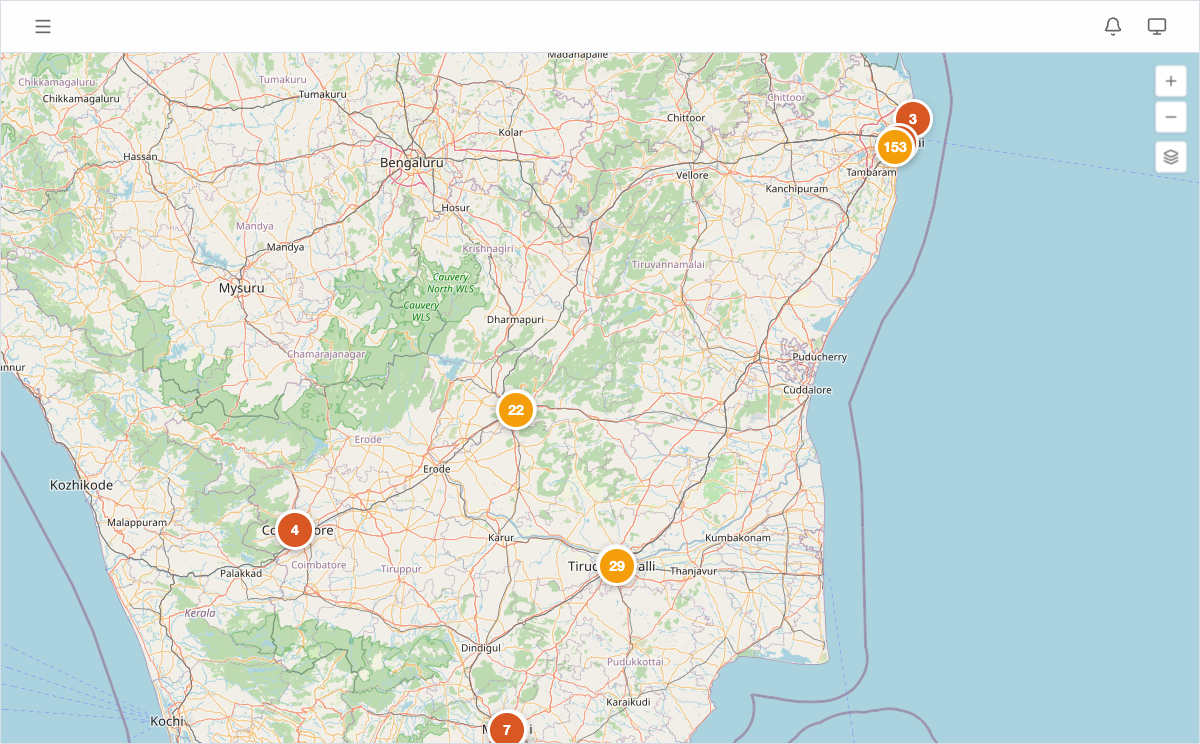
- Map View — Visualize both lead sites and nearby places on the same map to spot clusters and gaps at a glance.
Tip: The real power here is comparison. When two sites look similar on paper, proximity data often reveals which one has the better micro-location.
What makes a strong proximity score
Sites surrounded by more infrastructure categories tend to score higher for residential and mixed-use development. Here’s what to look for:
- Transport access — Railway stations, airports, and bus terminals within a reasonable radius. Good connectivity drives up land value.
- Essential services — Schools, hospitals, and banks nearby improve livability and make projects easier to market.
- Commercial activity — Malls and supermarkets signal existing economic demand, which means buyers are already looking in the area.
Tips for better insights
- Be thorough — Add all relevant nearby places, not just the closest ones. More data points produce richer, more reliable analysis.
- Use accurate locations — Paste Google Maps URLs rather than dropping pins roughly. Even a 200-metre difference matters for distance calculations.
- Keep data current — If a new metro station or hospital opens, add it promptly so your insights stay fresh.
- Cover all categories — Infrastructure diversity matters. A site near a school and a hospital is more attractive than one near two schools.
Tip: Before a site visit, check proximity data first. It helps you prioritise which sites to see in person and what to verify on the ground.
Viewing proximity data on the map
Open Map View from the sidebar to see lead sites and nearby places plotted together. Use the layer controls to toggle categories on and off, making it easy to focus on specific infrastructure types — for example, showing only transport to evaluate commute access.