The pipeline at a glance
Lead sites move through four active pipeline stages in sequence:
Inquiry → Shortlist → Analysis → Closed
Two exit statuses sit outside the pipeline:
- Dropped — your team chose not to pursue the site
- Rejected — the landowner declined or the site is no longer viable
For a description of what each status means, see Understanding lead statuses and transitions.
How to change a lead’s status
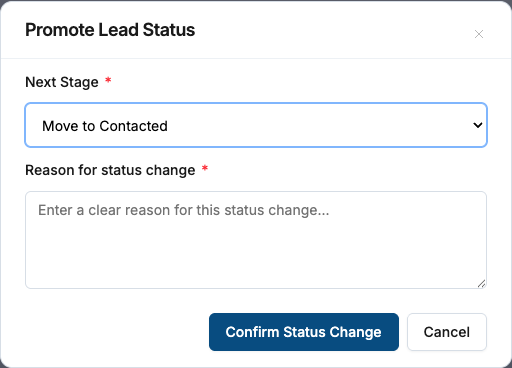
Open the lead’s detail page. In the header, you’ll see the current status badge. Click it to open the status transition panel. The panel shows only the transitions available to you based on your role and the lead’s current status. Select the target status, optionally add a reason, and confirm.
The page header and status bar update immediately without a full reload.
Promoting a lead
Promotion moves a lead forward in the pipeline — one step at a time:
| From | You can promote to |
|---|---|
| Inquiry | Shortlist |
| Shortlist | Analysis |
| Analysis | Closed |
You cannot skip stages. A lead at Inquiry cannot jump directly to Analysis or Closed.
Demoting a lead
Demotion moves a lead backward by one step. Only Admins and Managers can demote leads.
| From | Can be moved back to |
|---|---|
| Shortlist | Inquiry |
| Analysis | Shortlist |
| Closed | Analysis |
Dropping and rejecting a lead
Admins and Managers can move any non-terminal lead to Dropped or Rejected from any pipeline stage (Inquiry through Analysis). These are terminal statuses — once set, the lead exits the active pipeline.
Use Dropped when your team is walking away from a site. Use Rejected when the deal fell through because of the landowner’s decision or an external disqualifier.
Reopening a dropped or rejected lead
Only Admins can reopen a lead that has been Dropped or Rejected. The only available backward transition from either of those statuses is back to Analysis. From Analysis, the lead can continue through the normal pipeline.
If you need to reopen a lead and you are a Manager, ask your account Admin to do it.
Role permissions summary
| Role | Promote | Demote | Drop / Reject | Reopen (Dropped/Rejected) |
|---|---|---|---|---|
| Admin | Yes | Yes | Yes | Yes |
| Manager | Yes | Yes | Yes | No |
| Field Executive | Yes* | No | No | No |
| Lead Assistant | No | No | No | No |
* Field Executives can only promote leads assigned to them, and only one step at a time.
Activity log
Every status change is recorded in the lead’s activity log with the actor’s name, the previous status, and the new status. You can view this log by scrolling to the Activity section on the lead detail page. The log cannot be edited or deleted.